Chapter 25
When a checkbox creates responsibility
Gary looked at the new Compilation checkbox.
It worked.
Now he could filter.
Now when he searched for Miles Davis the system would only return real albums.
Kind of Blue.
Bitches Brew.
Miles Ahead.
Not Christmas Jazz Collection.
Not Late Night Saxophone.
That problem was solved.
But another one appeared.
A new expectation
Gary leaned back.
“If we mark something as a compilation,” he said,
“then it should actually be one.”
Sam looked at him.
“You mean?”
“If I check Compilation…
I expect there to be more than one artist connected.”
Sam nodded slowly.
“That’s not about search anymore.”
“No,” Gary said.
“That’s about consistency.”
Adding a relational classification
They didn’t already have a way
to describe that structure.
So they added one.
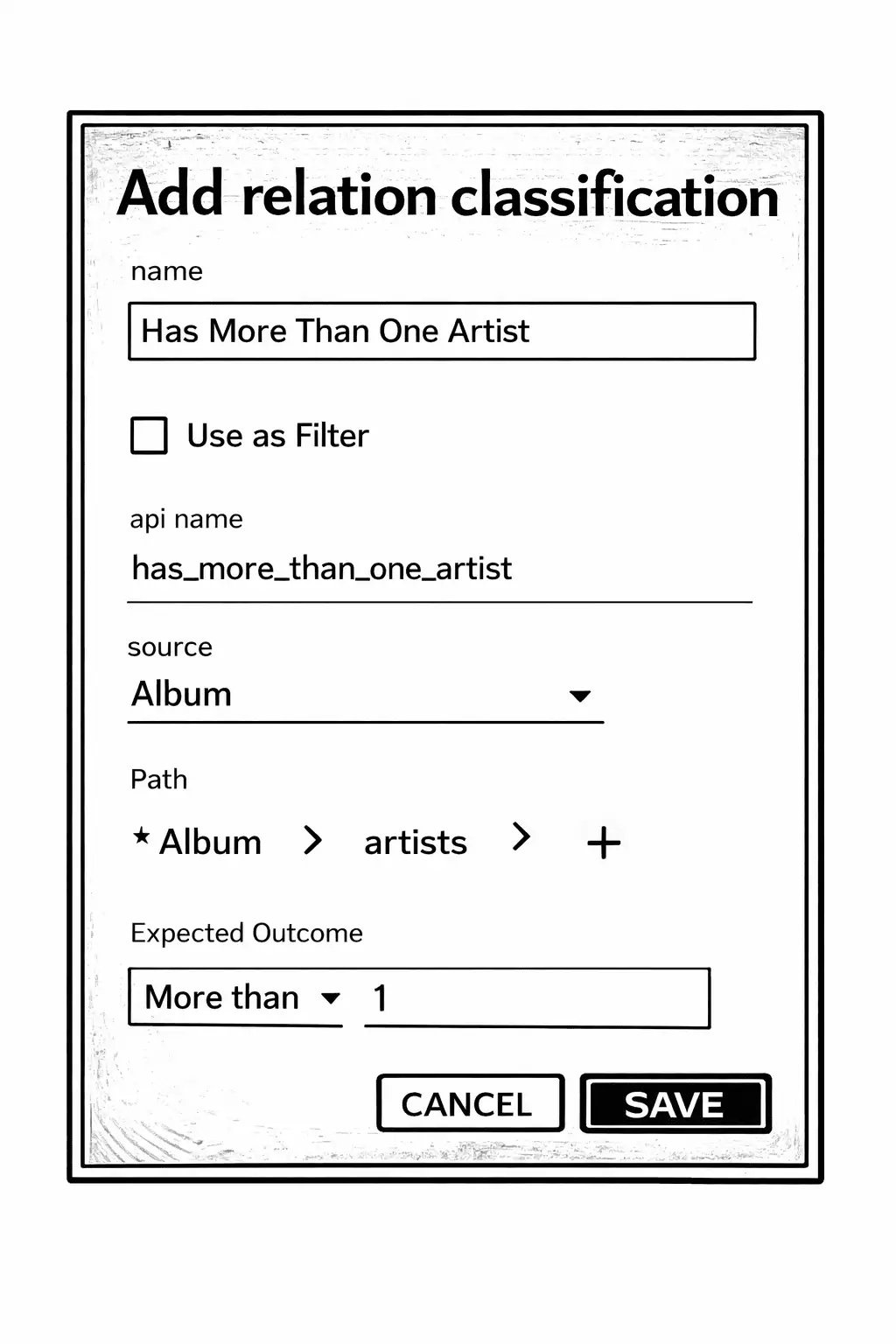
Name: Has More Than One Artist
Source: Album
Path: Album → artists
Expected outcome: More than 1
This classification didn’t look at a checkbox.
It didn’t look at text fields.
It followed the relationship.
If the album had two or more connected artists,
the classification became true.
If it had zero or one,
it was false.
Now the system could describe:
An album connected to multiple artists.
When two meanings collide
Sam pointed at the screen.
“So now we have two meanings.”
- The album is marked as a compilation.
- The album has more than one artist.
Gary nodded.
“But what happens if the checkbox is true…
and the album only has one artist?”
Sam didn’t answer.
Gary frowned.
“That’s not a missing value,” he said.
“It’s a mismatch.”
“Exactly,” Sam said.
“It’s meaning depending on more than one thing.”
Combining two conditions
They didn’t write code.
They configured a combination.
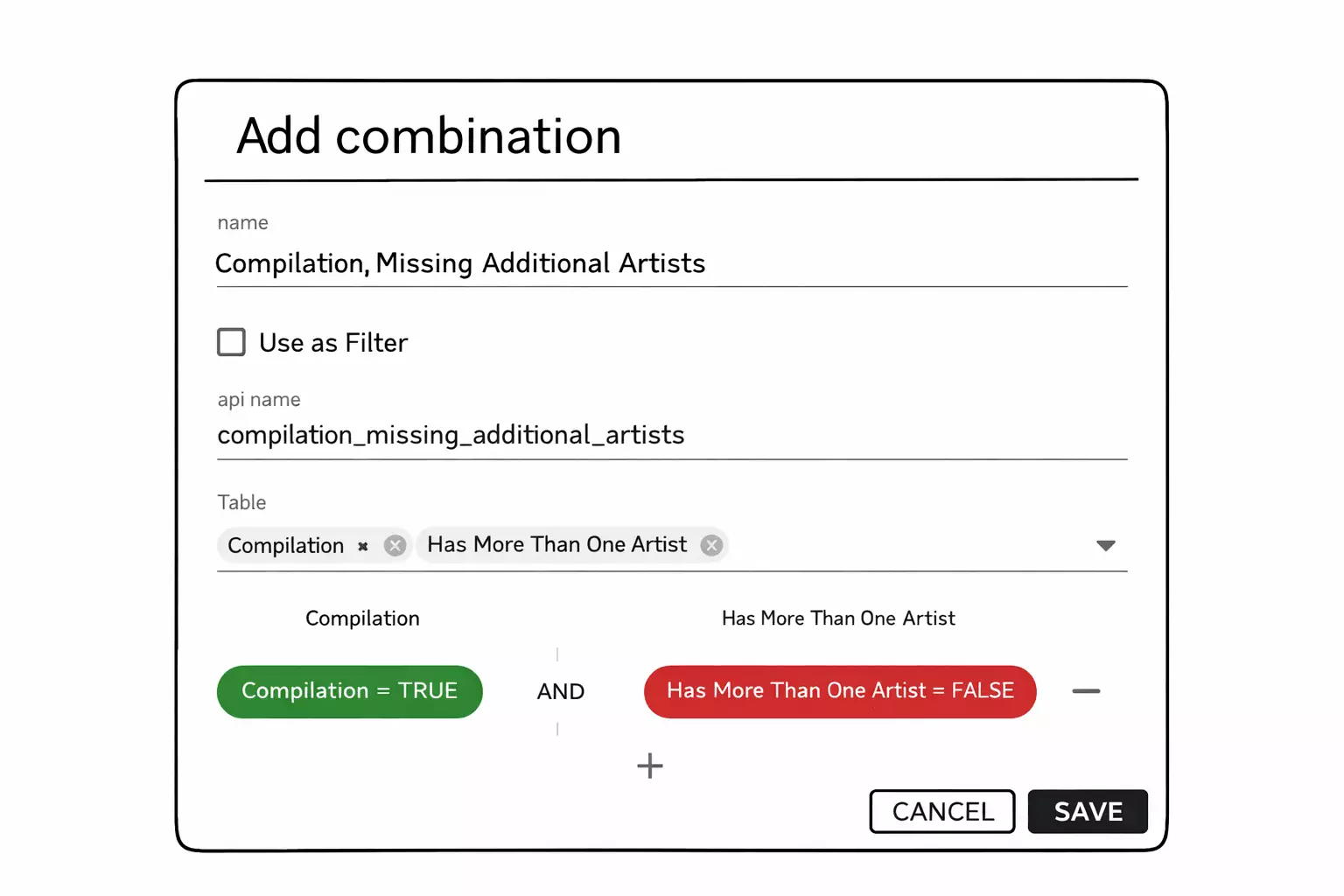
Sam opened the add Logical Classification modal.
Name:
Compilation Missing Additional Artists
Table:
Album
Filters:
Compilation = TRUE
AND
Has More Than One Artist = FALSE
He left Use as Filter unchecked.
“This doesn’t create new data,” Sam said.
“It combines two existing classifications.”
Gary watched the screen.
“So we’re saying:
– The album is marked as a compilation
– But it does not have more than one artist
Only when both are true
does this classification become true.”
Sam nodded.
“It’s not checking columns directly anymore.
It’s evaluating meaning.”
Gary folded his arms.
“So this becomes our definition of
‘something is off.’”
“Yes,” Sam said.
“And now we can decide what to do about it.”
Turning the mismatch into a boundary
The logical classification was now visible in the list.
Compilation Missing Additional Artists
Table: Album
Is filter: false
Write rule: Inactive
Read rule: Inactive
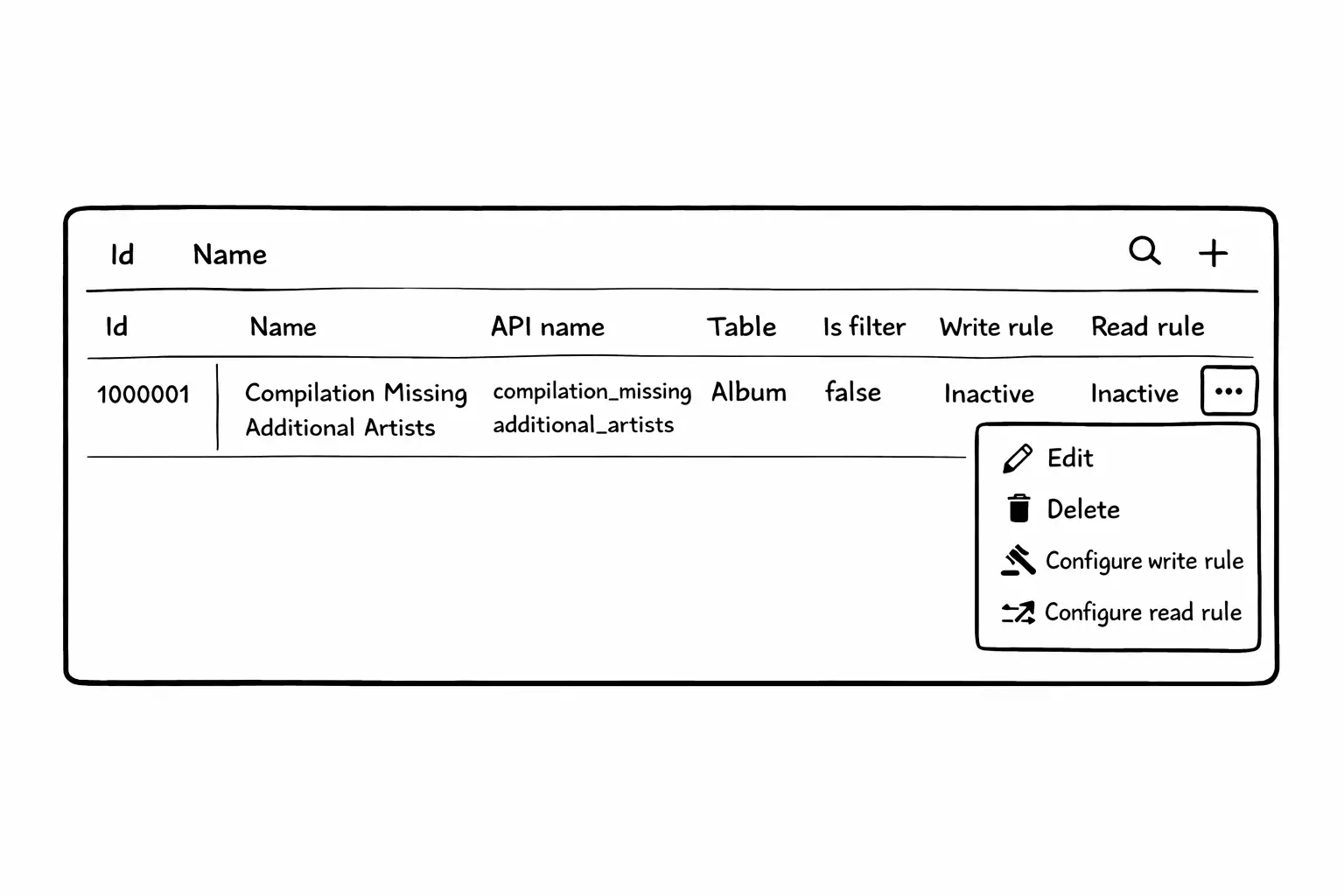
Gary looked at the row.
“So this describes the situation,” he said.
“But it doesn’t do anything yet.”
Sam clicked the menu.
“Then we give it consequences.”
They opened Configure write rule.
Active.
When true.
Severity: Error
Message:
An album marked as compilation must have more than one artist.
Message details:
If Compilation is checked, add all artists before saving.
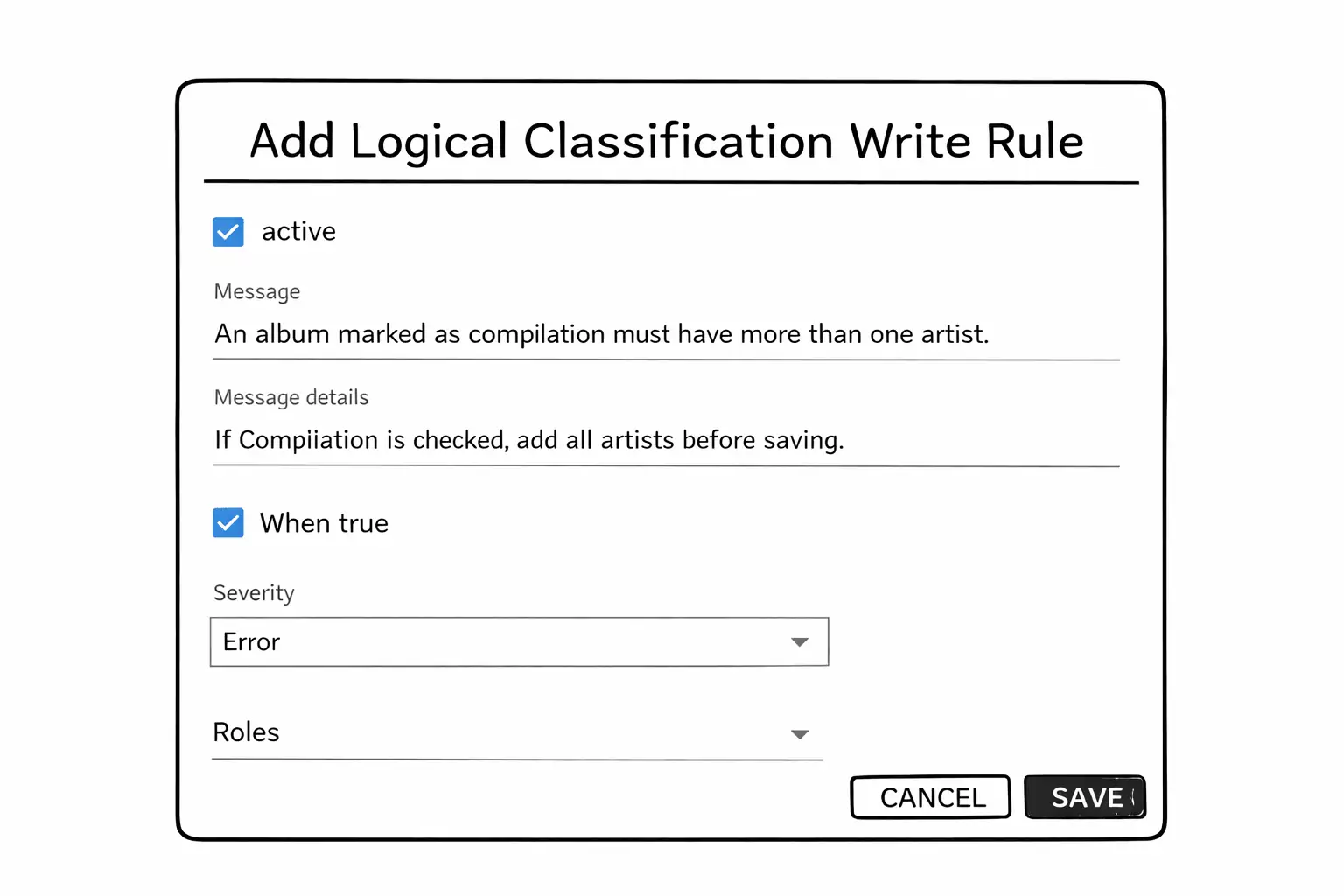
Now the classification was no longer just descriptive.
If:
- Compilation = TRUE
- Has More Than One Artist = FALSE
Then the save would fail.
Gary nodded slowly.
“So this is no longer just meaning.”
“No,” Sam said.
“It’s a boundary.”
Testing it in the form
They opened Add Album.
Gary entered the title.
Checked Compilation.
Then he added only one artist.
The message appeared immediately.
And the Save button turned gray.
Disabled.
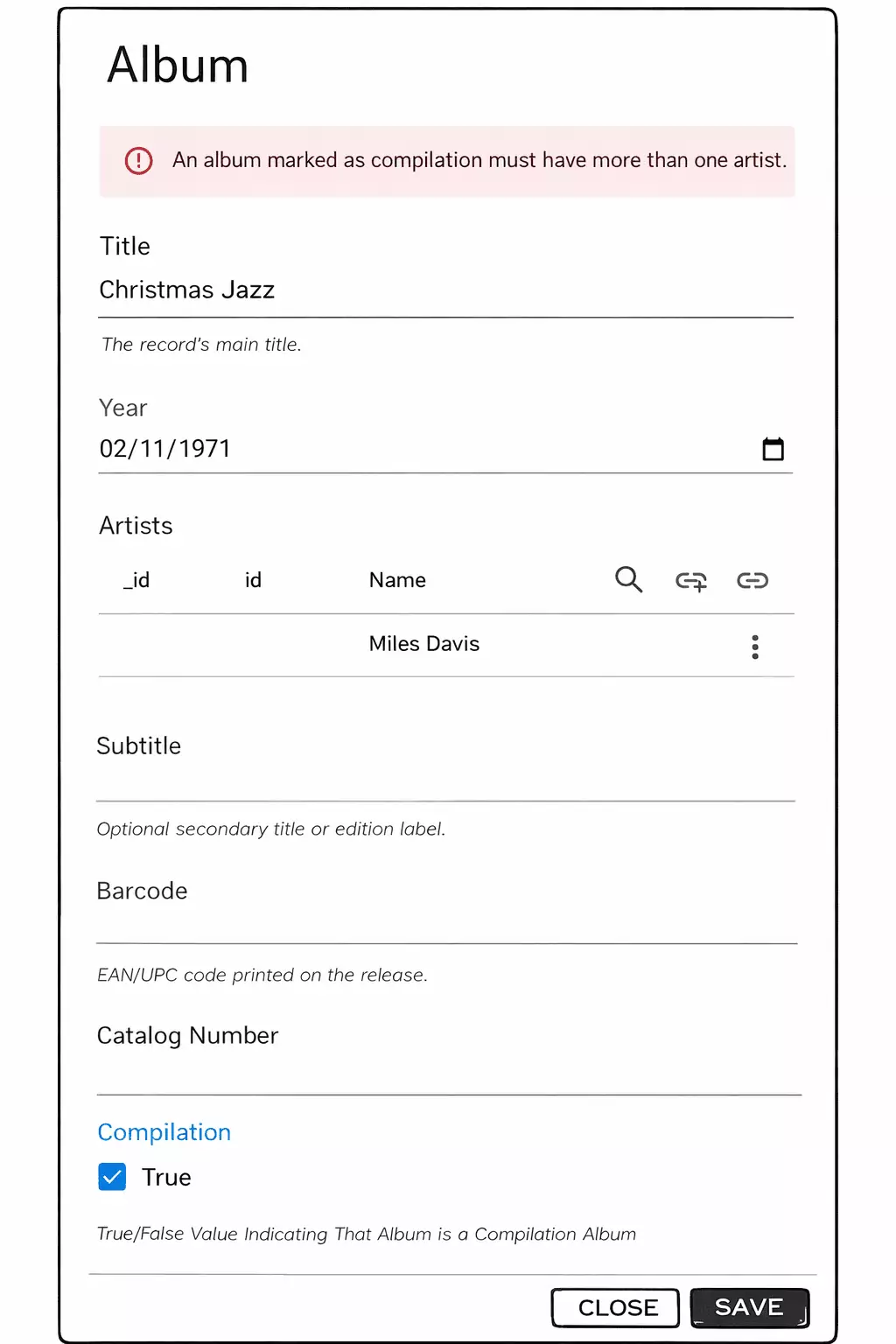
Gary hovered over the disabled button.
“It doesn’t wait for me to try,” he said.
Sam nodded.
“It evaluates continuously.”
“If the album would be saved right now
as a compilation with only one artist—”
“It refuses that outcome.”
What changed
Gary stared at the rule for a moment.
“It’s not the compilation flag that’s strict,” he said.
“It’s the combination.”
Sam smiled.
“Exactly.”
A single checkbox doesn’t create meaning on its own.
Meaning happens when multiple facts agree.
And when they don’t,
the system can treat the mismatch as an error.
Continue reading
The rule worked.
But Gary realized something uncomfortable.
Some compilations really do have one artist — rarely.
When that happens, Gary needs to break the rule himself,
without letting anyone else do it.