Use schedule data type
How to bind a schedule per row
This setup allows each row to select a specific schedule, such as work hours/
Each row stores a reference to a schedule, and the user can choose between predefined options.
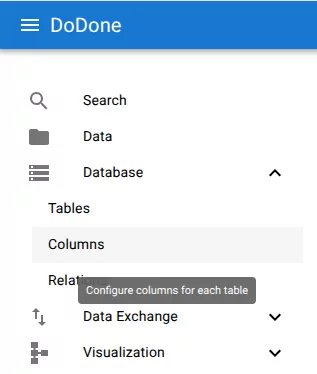
Step 1 — Navigate to columns
Navigate to:
Database → Columns
Step 2 — Add a schedule column
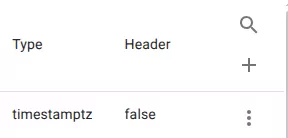
Click the + button to add a new column.
Step 3 — Configure the column as a schedule
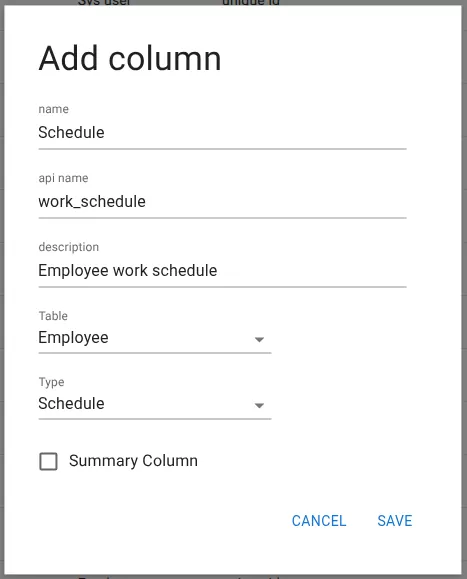
Fill in the column details:
- Name:
Schedule - Type: Schedule
- Select the table where it should be used (e.g. Employee)
Click Save.
Step 4 — Select schedule per row
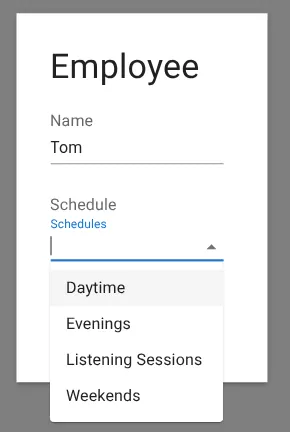
Open a row in the table.
The schedule column now allows selecting a schedule per row.
Result
Each row can now reference a specific schedule.
Example:
This enables:
- Different availability per row
- Flexible assignment of schedules
- Reuse of predefined scheduling configurations
Related resources
Understand the concept
Reference